Everything goes on one list
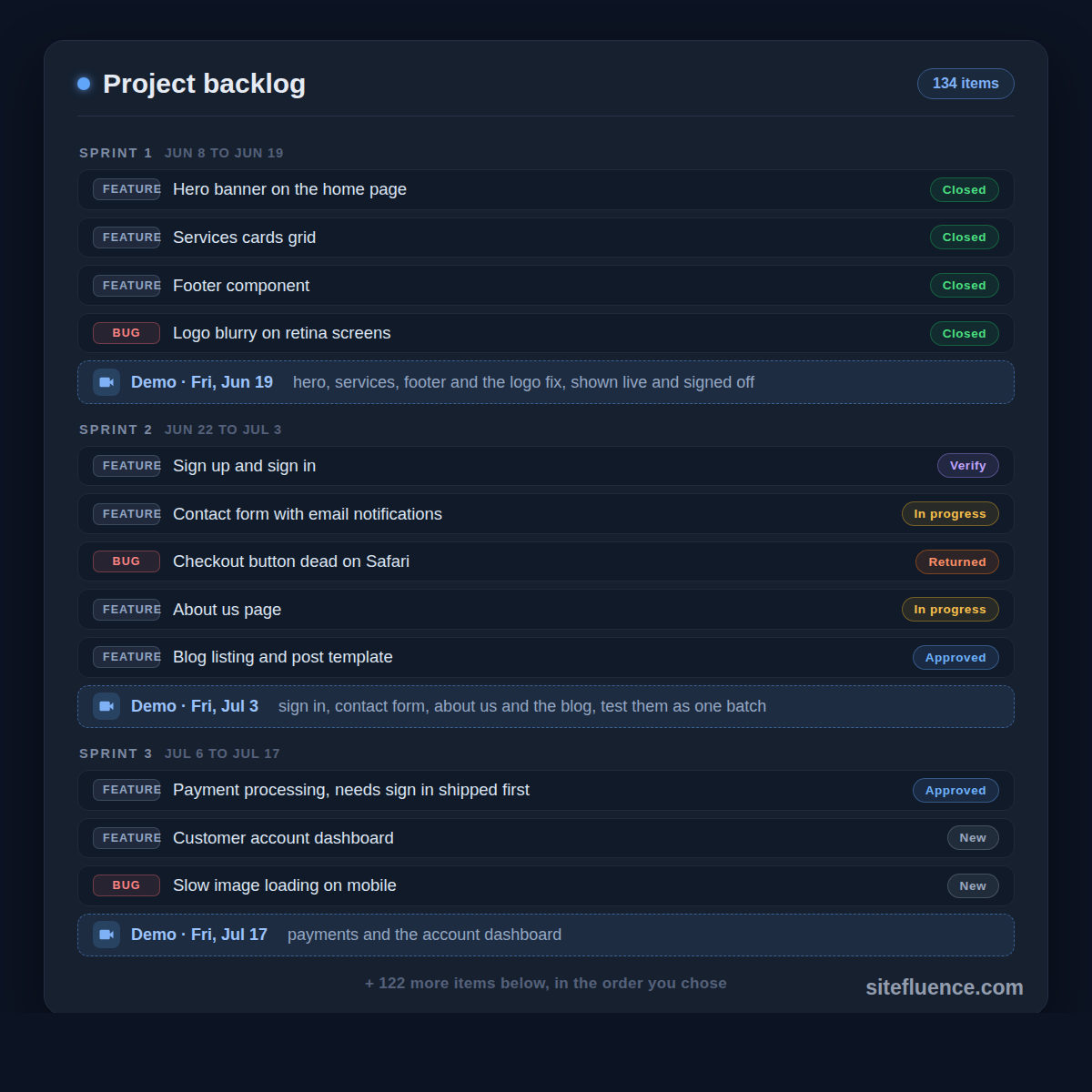
Build the hero banner. Add the services cards you described one component at a time. Fix the footer on mobile. Chase the checkout button that ignores taps on Safari. On a well-run project, every one of these lives on a single list called the backlog: everything that needs doing, feature or bug, in one place.1 Work happening off the list is a bad sign.
Deciding how to get it built? The free Vibe Code or Hire a Developer assessment scores your project in 8 questions and tells you whether to vibe code it, use a site builder, hire, or split the work.
Hard dependencies belong to your agency
Some items carry a technical dependency, an ordering baked into the software itself. Nobody can pay you before they can log in, so sign-up ships before payment processing. Your agency sets these orderings, and they are not up for debate. Overruling a hard dependency never ends well. When they say B needs A first, believe them.
Every other order belongs to you
Beyond those, the order is yours. This is your money being spent, and when you shop, you decide what to buy first; the store does not decide for you. Want the services grid live before the blog? Say so. Ordering the backlog is the job the industry calls the product owner,2 and that is you.
The life of a backlog item
Every item carries a status, and the whole journey is five stops:
- New: it just entered the list. Maybe one of a hundred tasks carved out of the scope document where you told them what you want. Maybe an email about the home page. Maybe a bug you reported.
- Approved: you signed off on spending time and money on it, dependencies permitting.
- In progress: their side. A team lead hands it to a developer, a senior reviews the code, their own testers check it on a private copy of the site. One status to you, because that machinery is their job.
- Verify: deployed where you can see it, on the site or a link they send. Test it like a buyer. Wrong? Send it back with notes; it lands as Returned and loops through In progress again. Right? Close it.
- Closed: archived for good, reference only. Want a new field next month? That is a new request. Broke three weeks later? That is a new bug.
Approval is where you guard your wallet
Nothing that costs real hours should reach a developer without your yes: rebuilding the site on a different technology, swapping Stripe for another payment provider, even a new hero banner. Behind-the-scenes maintenance, like updating the software the site runs on, does not need your sign-off. You are a gate for spending, not a gatekeeper for everything.
Sprints: verify in batches, not one by one
You will not babysit 150 items one at a time. The backlog gets chunked into sprints, a couple of weeks of work each, and every sprint ends with a demo: here are the twelve items we finished and deployed, test them. Verify the batch, return what is wrong, close the rest. Hard dependencies are theirs. Every other line on the list is yours.
References
Footnotes
-
Atlassian. "Product backlog: Tips for creation & prioritization" ↩
-
Scrum Guides. "The 2020 Scrum Guide: Product Owner" ↩