Verified October 17, 2026 against Sitecore's and Microsoft's own documentation.
Sitecore in Plain Words, the series:
- Sitecore in Plain Words: XM or XP, Where Does It Run, and Who Runs What?
- What Is the Difference Between Sitecore XM and XP?
- Where Can Sitecore Run? Six Hosting Models, Layer by Layer
- Who Looks After What in Each Sitecore Hosting Model?
- Why Does Sitecore Need More Than One Server, and What Is Headless?
- Will Your Sitecore Version Lose Support, and Should You Upgrade or Migrate?
One box for developers, separate servers for real traffic
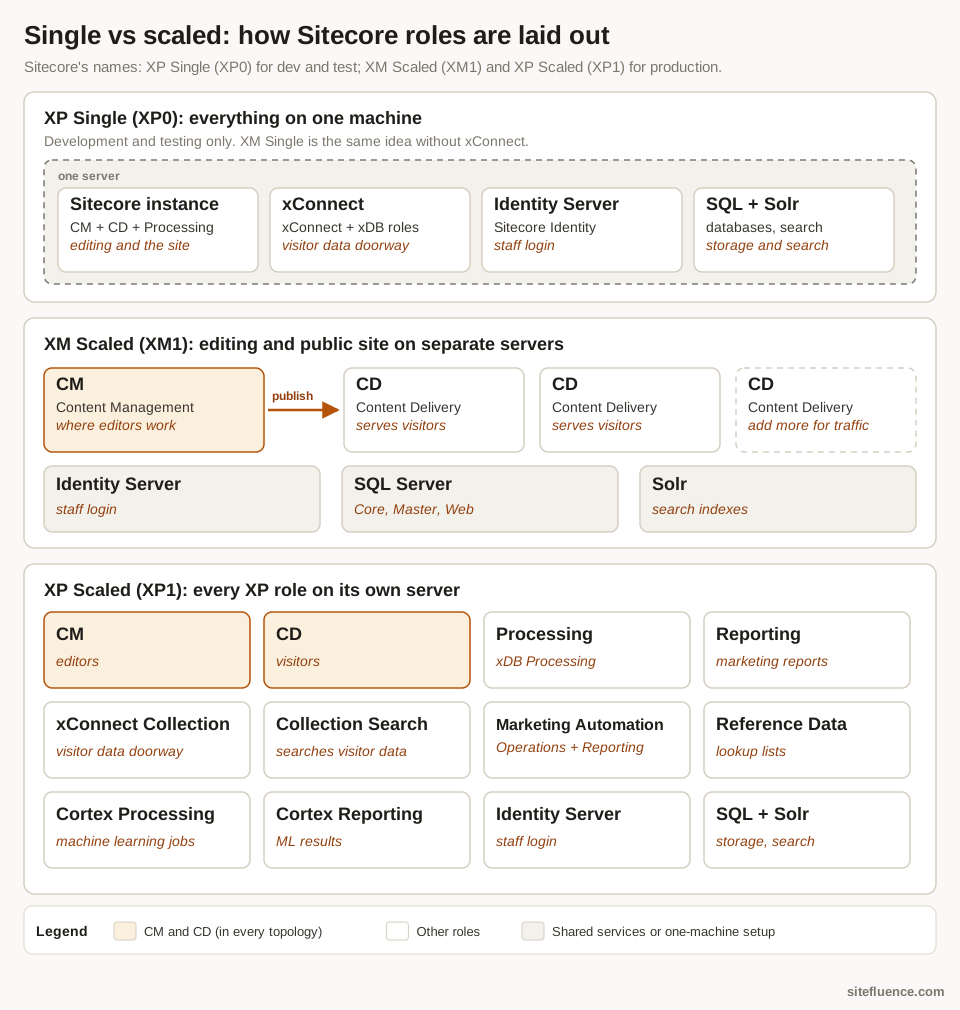
Sitecore calls these layouts topologies. The single setups (XP Single, XP0) put everything on one machine and are for development and testing; production should use a scaled one: XM Scaled (XM1) splits editing from the public site, XP Scaled (XP1) gives every XP role its own server.12 Roles are logical: several can share one physical server.
How pages get built: traditional vs headless
Traditional (MVC) is a restaurant that cooks and serves: Sitecore's own CD servers build each finished page. Headless is a central kitchen that ships ingredients to a separate shopfront: content is published to Experience Edge, Sitecore's content delivery service, and your own front-end app (often Next.js) reads it through a GraphQL API.3 SitecoreAI works this way. Moving a traditional site to headless means rebuilding the front end, not just copying content.
References
Footnotes
-
Sitecore docs. "Walkthrough: Deploying a new Sitecore environment to the Microsoft Azure App Service" ↩
-
Sitecore docs. "Choosing a topology" ↩
-
Sitecore docs. "Publishing to Experience Edge" ↩