Verified October 17, 2026 against Sitecore's and Microsoft's own documentation.
Sitecore in Plain Words, the series:
- Sitecore in Plain Words: XM or XP, Where Does It Run, and Who Runs What?
- What Is the Difference Between Sitecore XM and XP?
- Where Can Sitecore Run? Six Hosting Models, Layer by Layer
- Who Looks After What in Each Sitecore Hosting Model?
- Why Does Sitecore Need More Than One Server, and What Is Headless?
- Will Your Sitecore Version Lose Support, and Should You Upgrade or Migrate?
Yes, every version has an expiry date
Like a car warranty that thins with age, each XM and XP version gets three phases: Mainstream (full support), Extended, then Sustaining (mostly documentation and upgrade help).1 10.0 and 10.1 leave extended support on 31 December 2026. On an older version there are two roads: upgrade in place, or migrate to SitecoreAI.
What changed in June 2026
Since 1 June 2026, security fixes and production incident help in the Extended phase are no longer included by default; you discuss options with your Sitecore account representative. Sitecore's upgrade help applies when you move to a version still in Mainstream support, today 10.4 or 10.5.
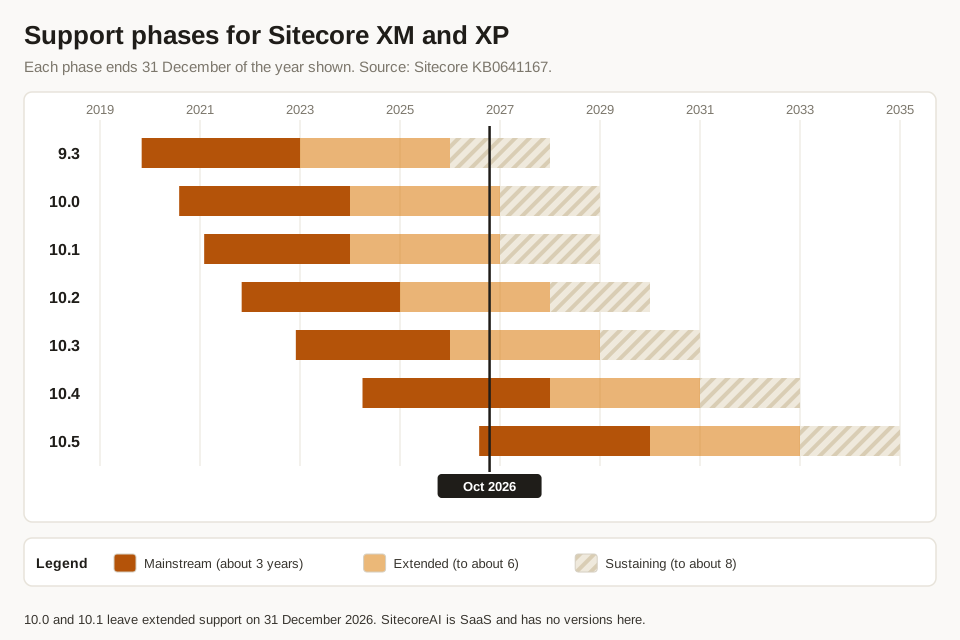
| Version | Released | Mainstream ends | Extended ends | Sustaining ends |
|---|---|---|---|---|
| 10.5 | Aug 2026 | 31 Dec 2029 | 31 Dec 2032 | 31 Dec 2034 |
| 10.4 | Apr 2024 | 31 Dec 2027 | 31 Dec 2030 | 31 Dec 2032 |
| 10.3 | Dec 2022 | 31 Dec 2025 | 31 Dec 2028 | 31 Dec 2030 |
| 10.2 | Nov 2021 | 31 Dec 2024 | 31 Dec 2027 | 31 Dec 2029 |
| 10.1 | Feb 2021 | 31 Dec 2023 | 31 Dec 2026 | 31 Dec 2028 |
| 10.0 | Aug 2020 | 31 Dec 2023 | 31 Dec 2026 | 31 Dec 2028 |
| 9.3 | Nov 2019 | 31 Dec 2022 | 31 Dec 2025 | 31 Dec 2027 |
Which fits you
Our consulting view, a starting point rather than a verdict:
- A content website, no deep visitor tracking: XM, or SitecoreAI if you want Sitecore to run it.
- Personalization and automation built on stored visitor history: XP, self-hosted or on Managed Cloud.
- No in-house server team: SitecoreAI, or Managed Cloud if you stay on XM or XP.
- Strict rules on where data and servers live: on-premises or your own Azure tenancy.
The two roads forward
Upgrade in place to 10.4 or 10.5: you keep XP's visitor data features and your site code, still run the servers (or Managed Cloud does), and reset the support clock. Migrate to SitecoreAI: Sitecore runs the platform, but the front end is rebuilt as headless; Sitecore offers SitecoreAI Pathway, AI-assisted migration workflows, for this move.2 Sitefluence is an independent Sitecore consultancy; if you are unsure which road is yours, talk it through with us.
References
Footnotes
-
Sitecore KB0641167. "Product Support Lifecycle" ↩
-
Sitecore Developer Portal. "SitecoreAI FAQ" ↩